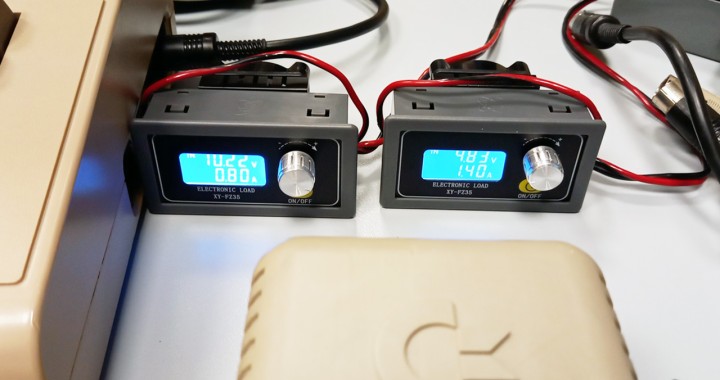
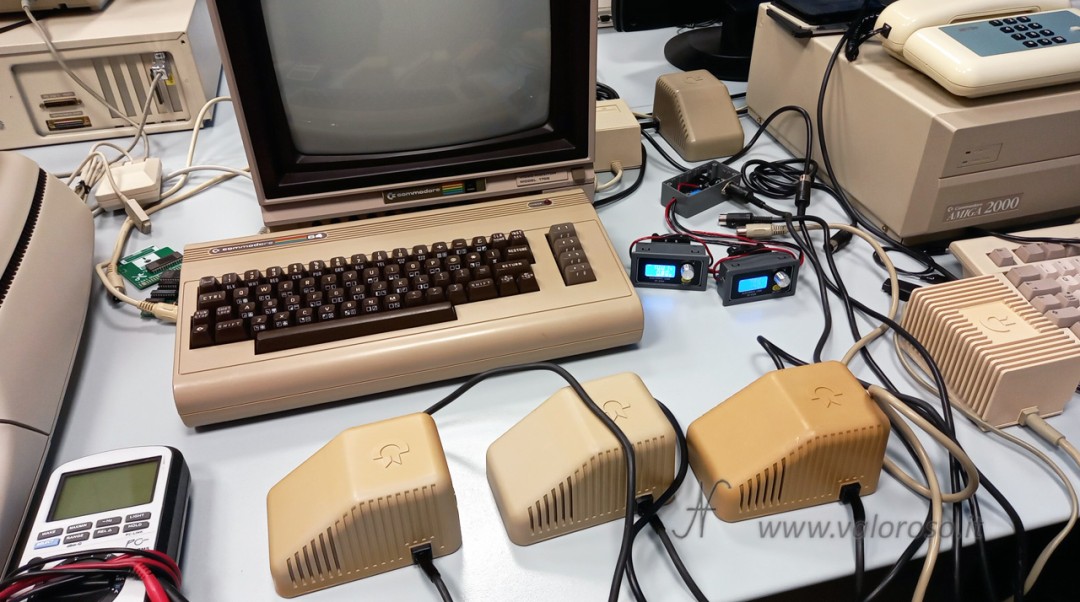
In this article we see how to build and use a PSU load tester for Commodore 64 and Commodore 64C that can check the power supply not only with no load but also under load.

We use two XY-FZ35 electronic loads to separately test the 5 V DC output and the 9 V AC output. This allows us to check voltage, current, stability over time and the thermal behavior of the power supply before connecting it to the computer.
Before making any connection to the PSU load tester, the Commodore 64 power supply must be disconnected from the mains. Even if the power supply fuse needs to be replaced, the plug must be completely disconnected from the outlet.
Why test the Commodore 64 power supply
The original Commodore 64 power supplies are now about forty years old. Some still work perfectly, others may be faulty and others may appear to work with no load but show problems when they actually have to supply current.
It is therefore not a good idea to use the Commodore 64 itself as a load to check whether its power supply works.

I had already covered this topic in the article How to turn on the Commodore after many years, where I checked the voltages with a multimeter before connecting the power supply to the computer.
With this PSU load tester we go one step further. In addition to measuring the voltages, we apply a controlled load to the power supply. This allows us to immediately see how the voltage changes when we start drawing current.
Power supply voltages and connector
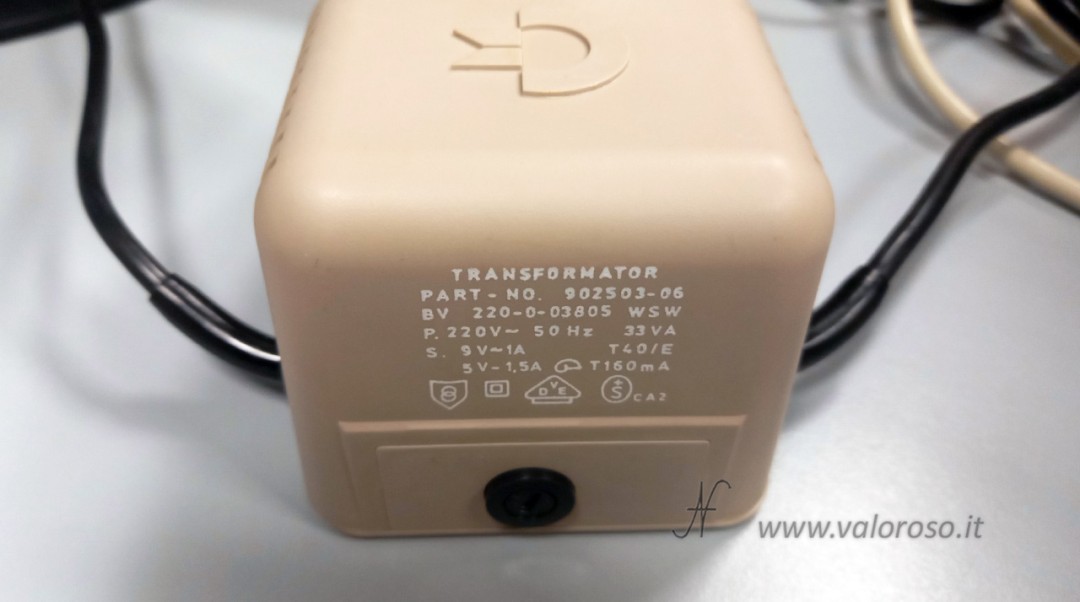
A classic brick-style Commodore 64 power supply is rated for a 5 V DC output with a maximum current of 1.5 A and a 9 V AC output with a maximum current of 1 A. The power supply in the photo has a 220 V AC 50 Hz input, a nominal power rating of 33 VA and a T160 mA fuse on the transformer primary.
PSU load tester schematic
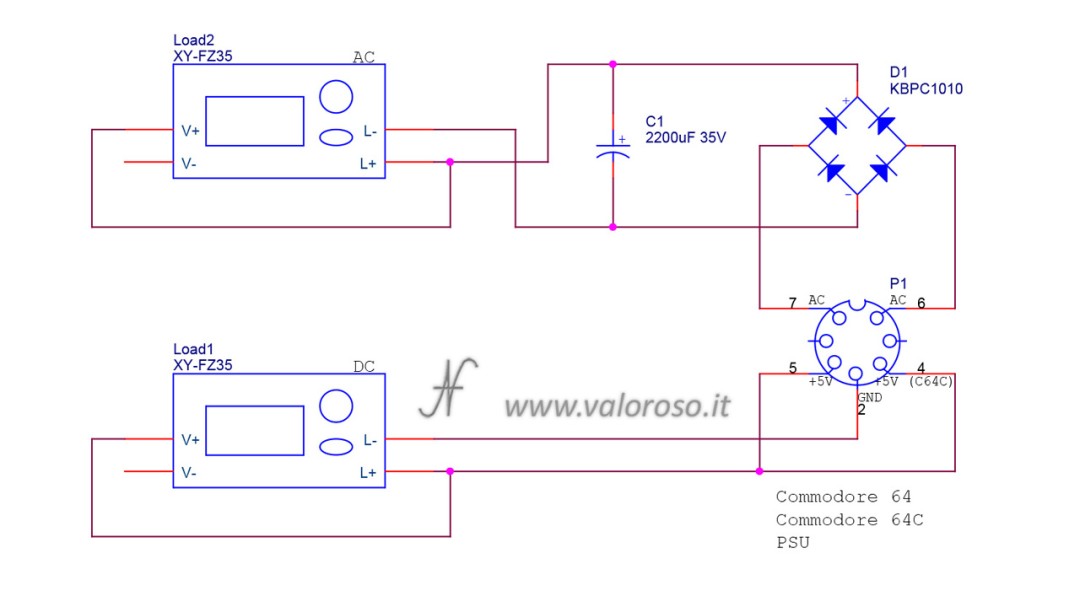
Let us start describing the schematic from the pinout of the Commodore 64 power supply DIN connector, identified as P1.

In the wiring diagram, the connector is shown with the contacts facing the observer. This representation is particularly convenient if we use a female DIN socket to build the tester, because it corresponds to the side where we make the solder connections.
The pinout may therefore appear reversed compared with some diagrams available online.
To make the tester compatible with the different versions of Commodore 64 and Commodore 64C power supplies, I connected pins 4 and 5 for the 5 V DC output in parallel. This way we do not have to worry about which of the two contacts is used by the specific version of the power supply we are testing.
The schematic is essentially divided into two independent sections.
The first section concerns the 5 V DC output. The Commodore connector pins carrying this voltage are connected directly to the first XY-FZ35 electronic load.
The positive is connected to L+ and also to V+, while the negative is connected to L-. In the configuration used for this project, V- can be left unconnected because it is already internally connected to L- on the module.
In this way, the same Commodore power supply also powers the electronics of the XY-FZ35 and no auxiliary power source is required.
The second section of the schematic handles the 9 V AC output. The XY-FZ35 operates on DC, so the AC voltage must first be rectified. I recommend using a bridge rectifier rated for at least 10A, such as the KBPC1010, even though the actual current required from the power supply is much lower.
Using an oversized component means it is less stressed than a bridge selected exactly at the required current limit.
After the bridge there is a 2200 microfarad 35 V electrolytic capacitor used to smooth the rectified voltage. A capacitor with a higher voltage rating can be used without problems, while I do not recommend going below 35 V.
The resulting DC voltage is then connected to the second XY-FZ35.
In my build, both electronic loads are powered directly by the same voltages they measure and load. This solution makes the PSU load tester simpler because it does not require an additional external power supply.
There is, however, a practical consequence to keep in mind. If the voltage supplied by the Commodore power supply drops significantly, the brightness of the electronic load display may also change. If one of the voltages is completely missing, the corresponding electronic load remains off.
For example, if the fuse on the primary side of the Commodore 64 power supply is open, neither the 5 V DC voltage nor the 9 V AC voltage is generated. As a result, both PSU load tester displays remain off.
It is also possible to power the XY-FZ35 modules separately using a dedicated power supply connected to their V+ and V- power inputs. In this case the display brightness remains constant and we can also see a condition with zero voltage and zero current when the Commodore power supply provides no output.
This solution does make the test bench more complex because an additional power supply and a second mains connection are required. For this reason, in my build I preferred to leave the electronic loads powered directly by the power supply being tested.
Returning to the female DIN socket needed to build the tester, it is still fairly easy to find in electronics stores. If the connector is not available, test leads with alligator clips can be used by carefully identifying the power supply contacts. However, I consider this only a temporary alternative.
The pins are close together and a clip that moves can cause a short circuit. If you are not confident with this type of work, it is much better to obtain the correct connector.
Why we do not read 9 V on the second electronic load
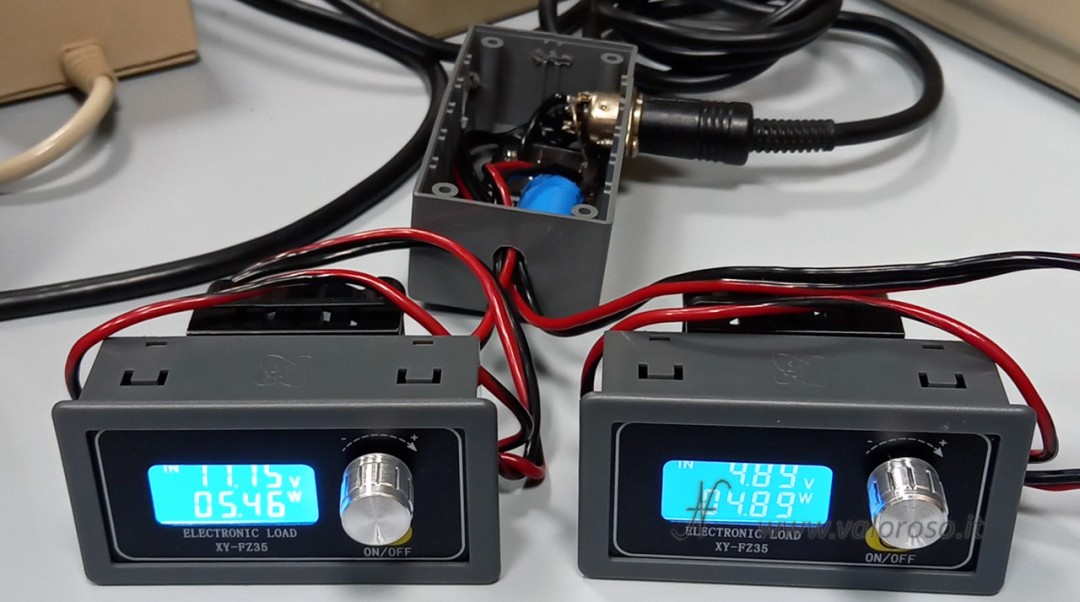
The 9 V stated on the power supply label represents the RMS value of the AC voltage.
When we rectify it and use a smoothing capacitor, the resulting DC voltage tends toward the peak value of the AC voltage. As a first approximation, this value is obtained by multiplying the RMS value by about 1.41.
With 9 V RMS we therefore theoretically obtain about 12.7 V peak.
We must also take into account the voltage drop introduced by the bridge rectifier. Two diodes conduct during each half-cycle, so part of the voltage is lost across the bridge.
In addition, original Commodore power supplies show a fairly wide variation in the AC voltage. The value changes significantly with the load and can also vary between two apparently identical power supplies.
During testing, the second XY-FZ35 may therefore show values of around 13 V DC with no load, dropping to about 9.5 V DC when the load is enabled.
These values must not be compared directly with the 9 V AC stated on the label because the measurement is taken after rectification and smoothing.
How to use the XY-FZ35 modules
The XY-FZ35 electronic loads make it easy to adjust the current drawn from the power supply.
By pressing the ON/OFF button we can enable and disable the load. This function is very useful because it lets us immediately see how the voltage changes from no-load conditions to loaded conditions.
By turning the knob we can increase or decrease the current draw.
By briefly pressing the knob we can change the display and check several parameters, including current, power and test duration.
By holding the knob down we enter the settings menu. Here we can also configure protections such as the OVP overvoltage threshold and the LVP undervoltage threshold.
These functions are particularly useful during an extended test. We can set a sufficiently wide voltage window and leave the power supply running without having to watch the displays continuously.
If the voltage crosses one of the set thresholds, the electronic load responds by disconnecting the load and reports the condition on the display.
For the settings, here is the XY-FZ35 electronic load manual.
How much load to apply to the power supply
We are absolutely not performing a destructive test and we do not need to find the failure limit of a forty-year-old power supply.
The main test can be performed at the nominal current stated on the label or slightly below it.
On the 5 V DC output of the power supply shown, we can therefore go up to about 1.5 A. If we want to be more cautious, we can stop slightly below that value.
It is also possible to test at different load levels. Simply turn the knob and progressively increase the current while observing how the voltage changes. This test is not essential, but it can be useful for understanding how the power supply behaves as the load increases.
For the 9 V AC output, remember that the second XY-FZ35 operates after the bridge rectifier and capacitor. Since the AC voltage is subsequently rectified and filtered with a high-capacitance capacitor, I recommend setting the electronic load current to about 60% of the nominal AC current stated on the power supply label.
For the power supply shown, which is rated at 9 V AC and 1 A, we can therefore set the second XY-FZ35 to a current of about 0.6 A DC.
On this output as well, it is preferable to use a cautious test and not try to overload the transformer.
Checking voltage and stability over time
The 5 V DC output must be much more precise than the 9 V AC output because it is regulated.
As a practical reference, we can consider about 5.15 V as the maximum with no load and about 4.85 V as the minimum at nominal load. Under load it is normal to see a lower voltage, but it must remain stable over time.
For the XY-FZ35 alarms it is advisable to leave a slightly wider margin than the normal operating range. We must also take into account the instrument accuracy, the contacts and the small voltage drops along the cables.
However, we should not look only at the maximum and minimum values.
It is also very important to observe voltage drift as the power supply warms up.
If, for example, the 5 V DC voltage starts at a correct value and continues to rise slowly over the following minutes, this is not a good sign even if it has not yet exceeded the maximum threshold.
The same applies to a voltage that continues to decrease progressively. Drift over time can indicate regulation problems, overheating or difficulty supplying the required current.
It is therefore advisable to check the voltage immediately after switching on the power supply and repeat the reading after a few minutes of operation under load.
Short cables and voltage drop
The connections between the power supply and the electronic load must be short and made with cables of adequate cross-section.
In my build I use 0.75 mm² speaker cable and keep the connections very short. Considering the complete outgoing and return path, the maximum total length is about 50 cm. At a current of 1.5 A, the theoretical voltage drop along the cables is therefore around 17 mV. Using cables with a larger cross-section further reduces the resistance and therefore the voltage drop. As a result, the value shown on the electronic load display when the load is applied is slightly lower than the voltage actually supplied by the Commodore 64 power supply.
Cable resistance depends on the resistivity of the material, its length and its cross-section. We can calculate it using the second form of Ohm's law:
R = ρ × L / S
Once we know the resistance and current, we can calculate the voltage drop:
V = R × I
On the ValorosoIT website you can find the Ohm's law, resistivity, AWG and mm² calculator, which I recommend using to try other cable lengths, cross-sections and load currents.
For the more technical readers who want to know the exact voltage actually supplied by the power supply, it is still preferable to use a multimeter and measure directly at the power supply connector contacts during the load test.
This way, the measurement does not include the voltage drop introduced by the PSU load tester wires, terminals and other connections.
Cleaning the connector before testing
Before starting the test, it is advisable to inspect and clean the power supply connector. Oxidized contacts can introduce resistance and therefore a voltage drop that increases as the current rises.
For cleaning the contacts I normally use an oil-based electrical contact cleaner, which cleans the contact and also leaves a light protective film.
Electronic load ventilation
The XY-FZ35 modules have a heatsink and fan on the back. The modules must therefore not be placed in a position that blocks ventilation. In particular, they must not be placed with the fan against the work surface.
The same principle applies if we decide to build a plastic or metal enclosure.
An enclosure would make this PSU load tester very convenient to use and transport, but openings and sufficient space must be provided to allow air to circulate around the heatsinks and fans and leave the enclosure.
Power supply temperature and smells
During an extended test, we should not monitor only the electrical values.
It is also advisable to periodically check the external temperature of the power supply and make sure that there is no smoke, smell of overheated plastic or other unusual signs.
I have tested many Commodore power supplies, including several units of the same model. For example, I have several brick power supplies that behave similarly electrically but show clear differences in temperature and smell.
Some power supplies become quite hot and may give off a smell of overheated plastic. Personally, I would not use these units even if their voltages are correct at that moment.
Other power supplies, subjected to the same type of load and left on for a long time, remain much cooler.
A basic empirical check can be made by touching only the outer casing of the power supply. If it becomes so hot that you cannot comfortably keep your hand on it, it is advisable to stop the test and investigate the problem.
If we can choose between several units, with comparable electrical behavior I would prefer the one that runs cooler and does not produce unusual smells.
Vintage or modern power supply
When discussing the Commodore 64, there is often a debate between those who prefer to use the original power supply and those who recommend replacing it with a modern one.
A well-designed modern power supply can certainly be a better solution, especially if the computer needs to remain on for many hours every day.
However, it must be genuinely well designed, with quality components, correct sizing, good filtering and adequate protection. A poorly designed modern power supply can introduce audio noise, video interference and reliability problems. In the worst case it can also put the computer at risk.
On the other hand, a vintage power supply can also fail. In particular, a problem with the 5 V regulation can cause the voltage to rise progressively to levels that are dangerous for the Commodore 64 electronics.
The ability to easily choose between an original and a modern power supply also comes from the fact that the Commodore 64 uses an external power supply.
In other vintage equipment, an important part of the power supply circuitry is internal. The Commodore 16, for example, receives a voltage from the external power supply but regulates the 5 V internally. The Commodore 1541 floppy drive contains its transformer, rectifiers and regulators internally. Monitors and TVs also have their own internal power supplies.
We therefore cannot think of preemptively replacing every power supply section in every vintage device.
For occasional Commodore 64 use, I prefer to carefully test the original power supply and continue using it if it passes the electrical, thermal and stability tests. If the computer instead needs to run every day for many hours, it makes sense to consider a high-quality modern power supply.
The test should be repeated over time
A power supply that passes all the tests today is not guaranteed to remain reliable forever.
Components continue to age and a failure can occur later. It is therefore advisable to periodically repeat at least the 5 V DC voltage check, especially if the computer and its power supply remain unused for long periods.
An additional C64 Saver type protection device can also be used on the 5 V DC line. This device can protect the computer in the event of an overvoltage, but it does not replace periodic power supply checks.
An evolution for Commodore Amiga
I later modified my PSU load tester so that I could also test some Commodore Amiga power supplies.
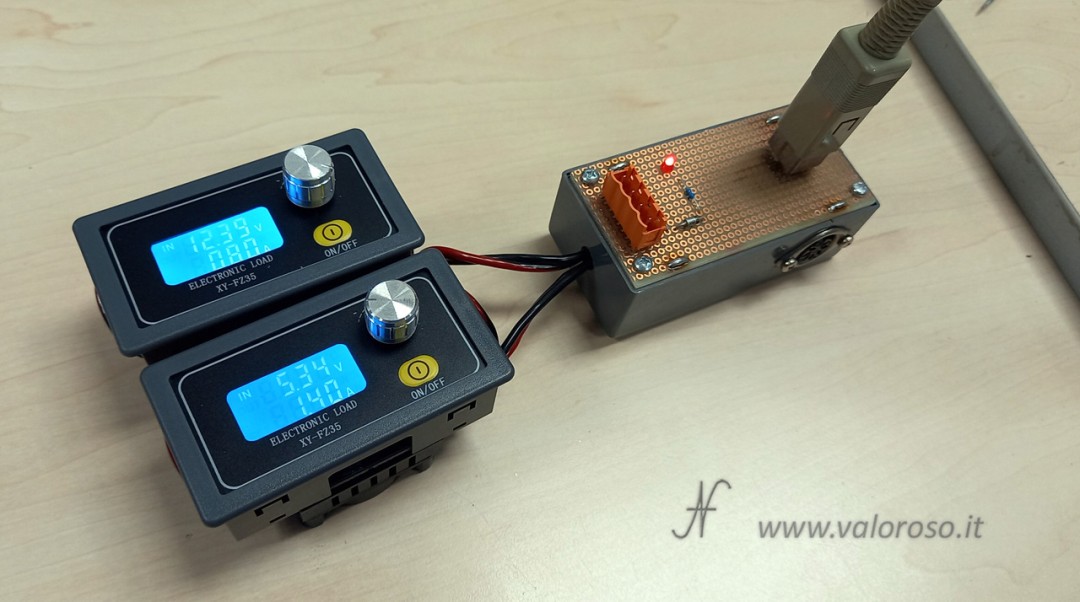
The 5 V DC output can be checked with the first electronic load, while the 12 V DC output is connected directly to the DC section of the second load, downstream of the bridge rectifier.
I also added a small separate LED circuit to check for the presence of the -12 V negative voltage. The LED is used as an indication that a sufficiently high negative voltage is present.
This modification is not yet included in the schematic shown in this article and probably deserves a dedicated follow-up with an updated diagram.
If you are interested in more projects, tests and repairs related to Commodore 64, Amiga, retrocomputers, electronics and computing, keep following ValorosoIT and subscribe to the @ValorosoIT channels so you do not miss the next content.